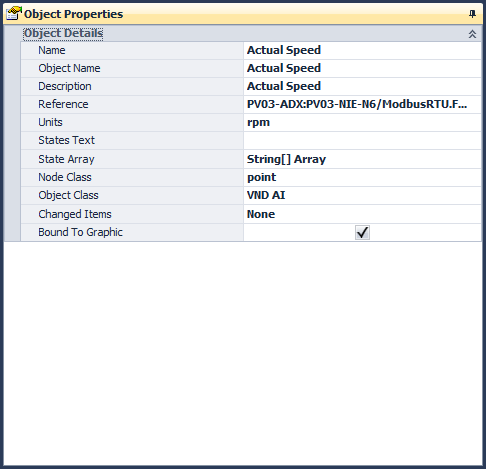
The object properties window shows all of the archive object info the current object that is selected. On the very right side of the window are 3 tab pages that show graphic related links to and from the current object.
Name
The name of the
object as defined in the SCT. This name is usually a friendly name and can
be changed in the SCT. Be careful not to assume that the name is the same
as the object name of the object. Most likely they are not going to be the
same. An exclamation point will flash on this window if the object and
name are not the same.
Object
The object name
of the object is the last portion of the object reference string. For
example: for reference object adx01:adx01/nae01.controller1.zn-t, the zn-t
is the object name.
Description
The description
of the object.
Reference
The object
reference string. This string uniquely identifies the object.
Units
If there are
units for the object, it will be shown here.
States
If the point is
a binary or multi-state object, the states will be shown. The states are
shown as a single string with a space separating each state. The leftmost
state is state 0. Example states: Off On
Node
Class
This identifies
what type of node the object is. Some possible values: server,
controller, folder, object, extension.
Object
Class
This defines
what type a object the object is. Some typical values: N2 AO, ADS, NAE, N2
BO, etc.
Changed
Items
This field
shows what changes were made to the fields in this object as compared to a
previous SCT database. If multiple items were changed, then they will show
up as field names separated by commas. For example, Description,States
indicates that the Description and the States were changed as compared to a
previous database. Also, any node in the archive tree that has changes to
it will be shown in Red font in the archive tree view and the system summary
list.
Bound
The bound
checkbox is the only field in the object details window that can be changed.
Normally, a validation tool will check the bound status for you, but in
some cases you may want to manually do this.