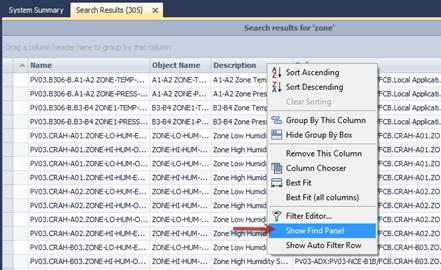
Right click on the columns to show the context menu. Click on “show find panel” or use CTRL-F.
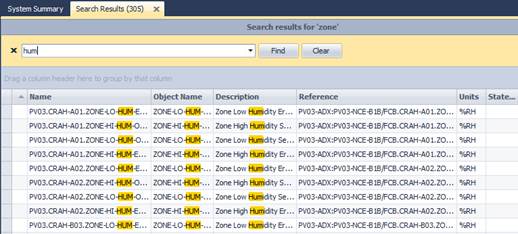
Enter a search term to highlight all cells that contain the item.
Search Syntax (Applies to find panel searches only)
In its simplest form, search criteria consist of a single word. If you want to search for a string containing a space character, specify this string in quotation marks. Without quotation marks, words separated by the space character are treated as individual conditions.
You can search against a specific column by preceding a search string with the column's display name plus a colon character.
ColumnDisplayCaption:SearchString
Instead of the complete name, it is possible to partially specify the display name, using the initial characters of a column's display name. A search will be performed against the first found column whose display name starts with the specified substring. If you want to search against a column whose display caption contains space characters, specify the column's display caption in quotation marks.
Logical Operators
If the search string contains two or more conditions separated by space characters, they are combined by a logical operator.
The OR operator is used if all conditions define a search against all columns simultaneously.
The AND operator is used if there is even one condition that defines a search against a specific column.
Precede a condition with "+" to select records that match this condition. Other records will be excluded from the result. The "+" specifier allows you to implement the logical AND operator. There should be no space character between the "+" sign and the following condition.
Precede a condition with "-" to exclude records that match this condition from the result set. There should be no space between the "-" sign and the following condition.
Examples
|
Search Criteria |
Description | ||
|
register |
Selects records that contain the "register" string in any search column. | ||
|
check register Dave |
Selects records that contain either "check" OR "register" OR "Dave" strings in any search column. | ||
|
"check register" |
Selects records that contain "check register" in any search column. | ||
|
screen +"Richard Fisher" |
Selects records that contain both "screen" AND "Richard Fisher" in search columns. | ||
|
data +entry -mark |
Selects records that contain both "data" AND "entry" in search columns, excluding records that contain "mark". | ||
|
menu mask -file |
Selects records that contain "menu" OR "mask", excluding records that contain "file". | ||
|
From:Roller Subj:"currency mask" |
Selects records that contain "Roller" in the column that starts with "From", AND also contain "currency mask" in the column that starts with "Subj". | ||
|
import -From:Steve |
Selects records that contain "import" in any search column, excluding records that contain "Steve" in the column that starts with "From". | ||
|
|
| ||
|
|
Searches performed using a Find Panel are case insensitive. | ||
