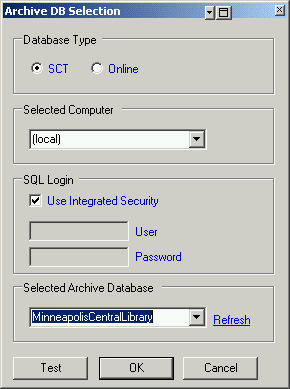
This window allows you to select and set your SCT archive database.
Database
Type
If you are
working with the SCT tool, select SCT. If you are working on an ADX or ADS
computer, select Online. (NOTE: This tool has not been tested with
the Online option).
Selected
Computer
Enter the
computer name of the SCT database (SQL server host). You may use (local)
or . for a local computer.
Use
Integrated Security
Check this for
Window authentication (default) or uncheck to use SQL security
authentication.
Select
Archive Database
Use the
drop-down list to select the SCT archive database name. The refresh button
will refresh the list if any of the above options are changed.
Test
Button
Click this
after you have all of your settings to verify you can connect to the
database.