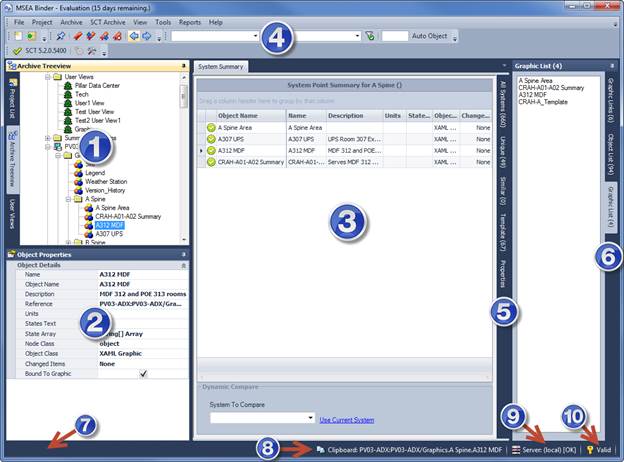
The main application is broken down into areas:
1) Project/Archive Information
Docking tab pages
for Project, Archive, and Userview Tree Views
2) Object Properties
Property grid for the
current selected object.
3) Document Tab Area
Shows search results, system
summary for the current system or the parent system of the selected node, and a
tab for the details of the selected object node.
4) Menu and Toolbars
5) System Tab Filters
You are presented with
docking tab pages that narrow down lists of information pertaining to the
systems and selected objects. This include Similar Systems, Unique Systems, Template Systems, System Properties
6) Graphic Object Filters
This area show 3
different tabs that indicates objects found for the current selected
object. If the object is a graphic object, then details about the graphic
links and object references within that graphic are shown in the tabs. If
the object is bound to a graphic, the graphic list tab will show all the
graphics that have that object bound. The tabs found are Graphic Links, Graphics List, and Object List.
7) Status Bar
Show any status of operations in
progress.
8) Last clipboard object reference
Show the last
object reference value sent to the clipboard.
9) Database Connection Status
Shows the SQL
server connection status. Click to change settings.
10) License Status
Show status of your
license. Click to open license dialog.